Quick answer
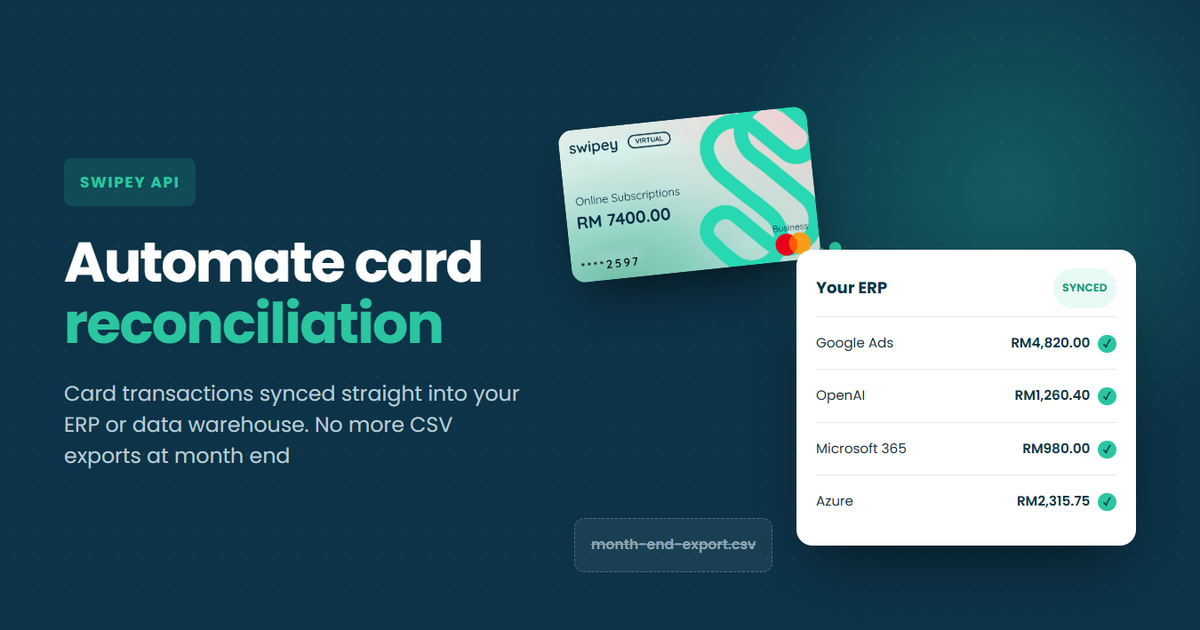
Automating card reconciliation means your systems pull card transactions from Swipey on a schedule, instead of someone exporting and re-uploading CSVs. With the Swipey API, free for every customer, your developer can sync transactions, MYR amounts, settlement updates and receipt links into your ERP, data warehouse or reporting tool.
Month end shouldn't start with a download button. Yet for a lot of finance teams it still does: export the card transactions, clean them up in a spreadsheet, upload them into the ERP or reporting tool, then spend the afternoon working out why the totals don't match.
The Swipey API takes that hand-off away. This guide covers what it pulls, when you need it, how to set it up in three steps, and exactly what to brief your developer so the numbers match the first time.
Every month, by hand
Export CSV → clean in a spreadsheet → upload to your system → chase what doesn't match
With the Swipey API
Transactions sync on a schedule → your team reviews what's already there
New to Swipey? It's a corporate card and expense platform for Malaysian businesses, with every transaction tracked in one dashboard. See the cards →
Why card reconciliation still eats month end
Most of the time goes on moving and fixing data, not checking it. Every manual hand-off is a chance for the same five problems to creep in, and the API answers each one:
| Problem |
What usually happens |
How the Swipey API handles it |
| Foreign-currency charges |
The MYR amount in your books doesn't match the USD invoice from your ads or SaaS vendor |
Each transaction carries the MYR amount that hit your wallet and the original currency amount |
| Amounts change after the charge |
A charge settles at a different amount, and your spreadsheet is already out of date |
Status changes, like approved to settled, come through on the next sync |
| Missing receipts |
Someone chases the team for receipts the week of close |
List every transaction without a receipt, and pull receipt links for the rest |
| Who spent what |
Matching spend to a client, team or project line by line |
Filter transactions by card or by the employee who holds it |
| Duplicates |
The same CSV gets uploaded twice and nobody notices until the totals are off |
Every transaction has its own ID, so your system skips anything it already has |
What the Swipey API covers today
The API connects your systems straight to your Swipey account. Today it covers four things, and your developer decides when the sync runs, for example every morning or the day before close.
Card transactions
Every transaction, with filters
Cards
Every card and its status
Wallet balance
Check before a payment run
Bill creation
One at a time or in bulk
Do you actually need the API?
Probably not, if…
Your books live in
Bukku, Xero or QuickBooks. Swipey already syncs transactions and receipts to all three, no developer needed.
See how it works →
Yes, if you're…
An agency recharging client ad spend
E-com or retail running an ERP
A tech team feeding a data warehouse or BI tool
A group wanting one view across every company
Set it up in three steps
1
Request your API key
Message us on WhatsApp with the data you need (for example, reading transactions) and which of your companies it should cover. Each key only reaches what you approve, so a reporting key can't create bills.
2
Test it safely
Your developer builds and tests in a separate test environment first, without touching your real money or data. The full guide is at
developers.swipey.co.
3
Schedule the sync and go live
What to brief your developer
These five points save the most back-and-forth. Forward this box along with the transactions docs.[2]
Developer brief: Swipey transaction sync
1 Only pull what's new or changed. The API can return just the transactions created or updated since your last sync.
2 Store each transaction by its unique ID. If one comes back again, update it instead of adding a duplicate.
3 Book the MYR amount. It's what hit the wallet and should match your records. The original currency amount is for reference.
4 Net settlement corrections. When a charge settles at a different amount, Swipey records a correction. Group the related rows so they count as one charge.
5 Fetch receipts separately when needed. Adding a receipt doesn't count as a transaction change, so re-fetch for the latest receipt links.
Foreign spend and self-billed e-invoices
Clean transaction data helps with e-invoicing too. LHDN's MyInvois guidance notes that foreign suppliers can't issue invoices on the MyInvois System, so the Malaysian buyer issues a self-billed e-invoice instead.[1] If your team pays Google, Meta or OpenAI by card, having every foreign transaction in your system, with the merchant and MYR amount, makes that prep much easier.
Not tax advice. Check which e-invoicing requirements apply to your business with your tax adviser.
What month end looks like after
Month end becomes a review, not a rebuild. Your team opens the system they already use and checks transactions that are already there, with currencies converted, settlements updated and missing receipts flagged. Swipey customers using the built-in accounting sync already close their books 12x faster, and the API brings the same idea to every other system you run.
FAQ
Is the Swipey API free?
Yes. It's free for every Swipey customer.
Do I need the API if I use Bukku, Xero or QuickBooks?
Not for syncing your books. Swipey's built-in integrations already sync transactions and receipts to all three. The API is for ERPs, data warehouses, BI dashboards and in-house tools.
How often should card transactions be reconciled?
At least monthly, before you close the books. With the Swipey API syncing on a schedule, you can review as often as you like, because the data is already in your system.
Can I reconcile card spend in Excel instead?
Yes. You can export transactions from Swipey and work in a spreadsheet. The API removes the export and upload steps, which is where most copy errors and duplicates come from.
Can the Swipey API issue cards or send payments?
Not yet. Today it covers card transactions, cards, wallet balance and bill creation. Follow the changelog for new endpoints.
Stop exporting, start reviewing
Sync card transactions into the systems you already run. Free for every Swipey customer.